
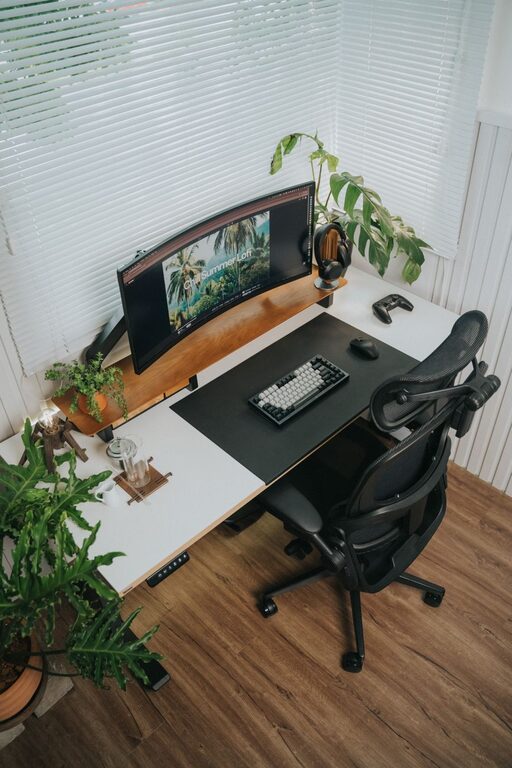
Creating a desk setup that supports both focus and comfort can make a significant difference in your daily work routine. Whether you work from home or in an office, having an organized and ergonomic workspace helps reduce distractions, prevent discomfort, and increase productivity. In this post, we’ll explore practical tips on how to set up your desk for optimal focus and comfort.
Why Your Desk Setup Matters
Your desk is more than just a surface to place your laptop or paperwork. It’s the foundation of your work environment. A well-designed desk setup encourages good posture, minimizes physical strain, and helps maintain mental clarity throughout the day. On the other hand, a cluttered or poorly arranged desk can cause unnecessary stress and fatigue.
Choosing the Right Desk and Chair
Desk Height and Size
Choosing a desk with the right height is crucial. Ideally, your desk should allow your forearms to rest parallel to the floor when typing or writing. An adjustable desk or standing desk converter can offer flexibility to switch between sitting and standing positions.
Make sure your desk is large enough to accommodate your essential tools without overcrowding. A spacious surface lets you organize items efficiently and helps maintain focus by reducing clutter.
Ergonomic Chair
Invest in a chair that supports your lower back and promotes good posture. Look for adjustable features such as seat height, lumbar support, and armrests. Your feet should rest flat on the floor, and your knees should be at or slightly below hip level.
Monitor and Screen Placement
The position of your computer screen has a big impact on your comfort and focus. Follow these guidelines:
– Place your monitor about an arm’s length away.
– The top of the screen should be at or slightly below eye level.
– Position the screen directly in front of you to avoid neck twisting.
– Use a monitor stand or riser if needed to achieve the right height.
Proper monitor placement reduces eye strain and neck pain, helping you stay focused longer.
Keyboard and Mouse Setup
Keep your keyboard and mouse close to your body to avoid overreaching. Your wrists should remain straight and relaxed.
Consider these tips:
– Use a keyboard tray or place the keyboard at elbow height.
– Choose a mouse that fits your hand comfortably.
– Use wrist rests if you experience wrist discomfort, but avoid resting your wrists while typing.
Lighting for Comfort and Focus
Adequate lighting is essential. Natural light is best for reducing eye strain and boosting mood, so position your desk near a window if possible. When natural light isn’t available, opt for a desk lamp with adjustable brightness and color temperature.
Avoid harsh overhead lighting and screen glare by positioning lights properly. If you suffer from eye strain, consider anti-glare screen protectors or blue light filters.
Declutter and Organize Your Desk
A tidy desk helps clear your mind and minimize distractions. Use organizational tools like trays, drawers, and cable management systems to keep your workspace neat.
Here are a few organization tips:
– Keep only frequently used items on your desk.
– Store supplies like pens, papers, and chargers in designated containers.
– Arrange cables with clips or ties to prevent tangling.
– Add personal touches like a small plant or photo to create a pleasant atmosphere without clutter.
Incorporate Comfort Accessories
Adding comfort accessories can improve your desk setup significantly:
– Footrest: Use a footrest if your feet don’t reach the floor comfortably.
– Ergonomic cushions: Consider seat cushions or back supports.
– Anti-fatigue mats: If standing while working, use an anti-fatigue mat to reduce pressure on your feet.
Take Breaks and Move
No desk setup can replace the benefits of taking regular breaks. Stand up, stretch, or walk around for a few minutes every hour to reduce muscle stiffness and refresh your mind.
Using a timer or reminder app can help you maintain consistent break habits.
Final Thoughts
A well-designed desk setup tailored to your needs promotes both comfort and focus. By paying attention to ergonomics, lighting, organization, and personal comfort, you can create a workspace that supports your productivity and well-being throughout the day. Start making adjustments today, and enjoy the benefits of a thoughtful, efficient desk environment.
About the Author